There's a certain kind of person who, instead of sending a text, opens their code editor.
I am that person.
This Valentine's Day, I built a full interactive web experience for my Crush. Cinematic entrance, an animated starfield, a physics-based "No" button that runs away from you, a handcrafted vinyl record player, a curated playlist, a gallery, original poems, a FAQ — and a real-time backend tracking every single interaction.
One question. Way too much engineering.
The Demo
Fair warning: it's desktop-only. The whole experience was designed for a large screen.
The Entrance
The first thing she sees is not the question. It's a theater.
Two curtain-halves of deep midnight sky slide apart. In the center: a soft bow and the words "For You." Clicking the bow starts a sequence of 9 messages that fade in and out one by one — each timed to breathe, not rush:
"this might be a little much.." "and i dont want you to feel rushed" "but i also just didnt want to miss the moment" "i hope you still smile a little... :)"
Each message triggers a soft page-turn sound. Only after all of them fade does the main experience reveal itself, with the curtains sweeping away via Framer Motion's AnimatePresence.
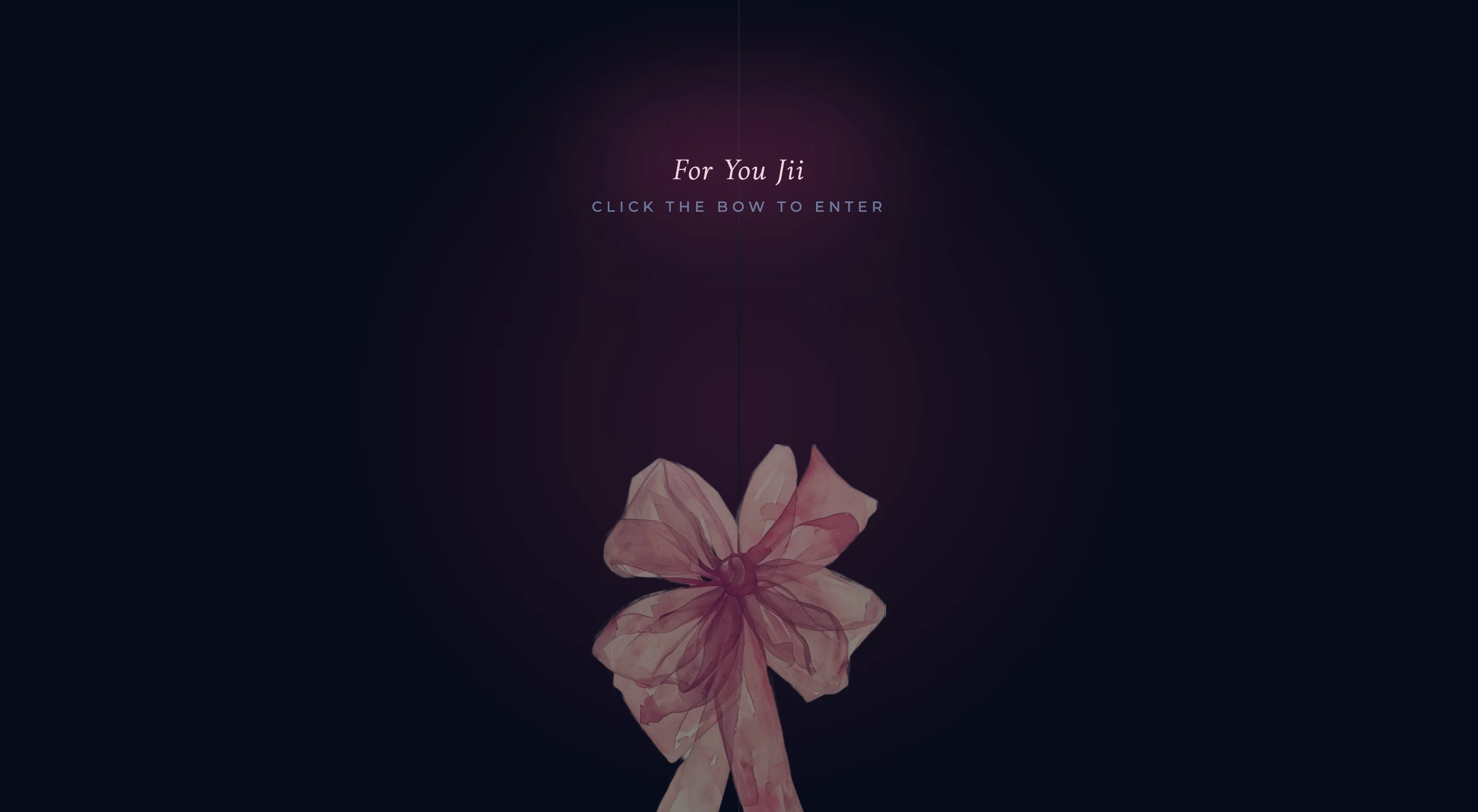
The curtain split is two motion.divs with exit: { x: "-100%" } and exit: { x: "100%" } — simple, but it reads as theatrical.
The Background: A Living Midnight Sky
The background isn't an image. It's built entirely from animated divs.
- 60 stars — each independently randomized in size (1px / 2px / 3px), position, opacity, and twinkle duration. No two blink at the same time.
- A floating moon that drifts in slow arcs via
y: [0, -20, 0]with an 8-second loop. Subtle rotate oscillation gives it life. - Animated clouds that drift in from off-screen and breathe.
- Three large color orbs — periwinkle (
#799EE4), sky blue (#92B8E4), hot pink (#FF4294) — animated with 30–70 second infinite loops andmix-blend-screenso they layer like colored light. Each orb is ~120–140vw wide and blurred to 120–140px. - A grainy SVG texture overlay at 20% opacity for film grain.
// Each star is an independently twinkling motion.div
{Array.from({ length: 60 }).map((_, i) => (
  <motion.div
    key={i}
    style={{
      width: Math.random() > 0.97 ? '3px' : Math.random() > 0.8 ? '2px' : '1px',
      height: /* same */,
      filter: Math.random() > 0.8 ? 'blur(0.8px)' : 'none',
    }}
    initial={{
      x: Math.random() * window.innerWidth,
      y: Math.random() * window.innerHeight,
      opacity: Math.random() * 0.5 + 0.1,
    }}
    animate={{ opacity: [0.1, 0.5, 0.1], scale: [0.3, 1, 0.3] }}
    transition={{
      duration: Math.random() * 6 + 4,
      repeat: Infinity,
      delay: Math.random() * 8,
    }}
  />
))}
The whole sky changes mode when music is playing — all animations slow down to ~2× their duration, opacities drop, stars dim. The orbs breathe instead of pulse. It goes from electric to quiet.
The Heart
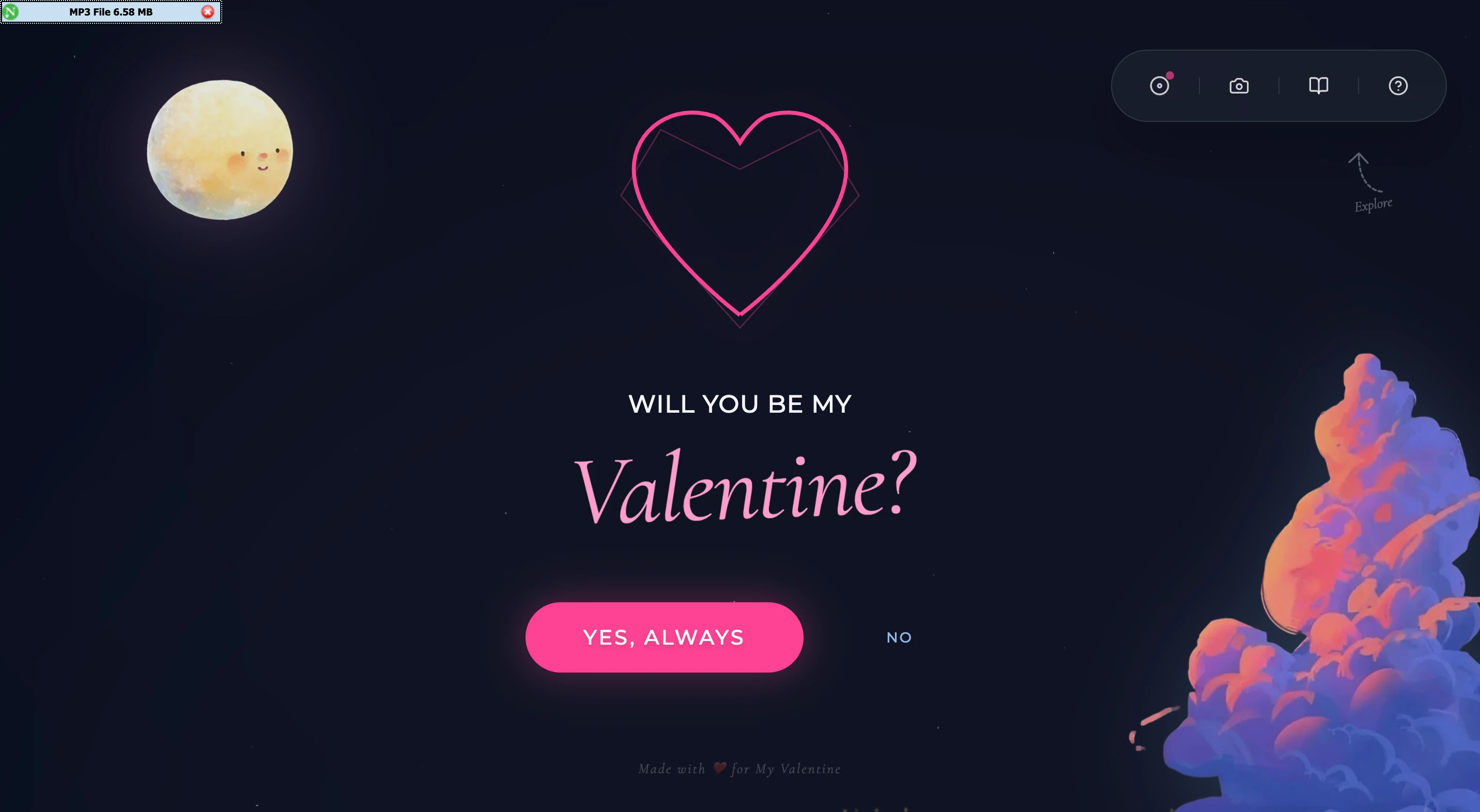
Center stage is an SVG heart drawn with an animated pathLength stroke. It starts at 0 and draws itself over 1.5 seconds on first render.
While the question is unanswered, it pulses — a slow scale: [1, 1.03, 1] breathe on a 3-second loop. Hovering the Yes button speeds the pulse to 0.5s, making the heart visibly react to your intent.
On "Yes", it fills solid pink and blooms — an inner glow circle springs to life with type: "spring".
<motion.path
  d="M50 85 C50 85 10 55 10 30 C10 15 25 5 40 10..."
  fill={isBloomed ? "#FF4294" : "transparent"}
  stroke="#FF4294"
  animate={{
    pathLength: 1,
    scale: isBloomed ? 1 : [1, 1.03, 1],
  }}
  transition={{
    pathLength: { duration: 1.5, ease: "easeInOut" },
    scale: { duration: isHovered ? 0.5 : 3, repeat: Infinity },
  }}
/>
The Two Buttons
This is the part I'm most proud of.
The "Yes" Button — Magnetic
The Yes button has a physics-based magnetic pull. As your cursor moves over it, the button floats toward you — 30% of the distance between your cursor and the button's center, driven by Framer Motion springs.
const handleMouseMove = (e: React.MouseEvent) => {
  const { left, top, width, height } = ref.current.getBoundingClientRect();
  const centerX = left + width / 2;
  const centerY = top + height / 2;
  x.set((e.clientX - centerX) * 0.3);
  y.set((e.clientY - centerY) * 0.3);
};

// Spring config: damping 15, stiffness 150, mass 0.1
const springX = useSpring(x, springConfig);
const springY = useSpring(y, springConfig);
Low damping + high stiffness = it feels sticky, like it's being pulled by a string. When you stop hovering, it snaps back with a little overshoot.
The "No" Button — Repels
The No button runs away. Every time you try to click it, it teleports to a random new position. The repulsion intensity scales with each attempt, capped at 3×. Its label changes too:
No → Are you sure? → Think again → Don't do this → My heart... → Please?
It never lets you click it. You physically cannot say no.
The Floating Dock
After the entrance plays, a glassmorphism dock appears in the top-right corner — backdrop-blur-2xl, bg-white/5, border-white/10, rounded-full. Four icons, four modals:
| Icon | Opens |
|---|---|
| Spinning disc | Vinyl record player + curated playlist |
| Camera | Gallery of memories (masonry layout with captions) |
| Book | Original poems |
? | FAQ: "Why Me?" |
The disc icon spins when music is playing — animate-[spin_3s_linear_infinite] — with a pink pulse dot in the corner as a "now playing" indicator.
A small animated arrow beneath the dock pulses downward with an italic "Explore" label. It disappears after first interaction.
The Record Player
Clicking the disc opens a full vinyl turntable UI built from scratch.
Left side: A dark platter with a spinning record (/music/record.png rotated via requestAnimationFrame at 0.5°/frame when playing). A tonearm mounted top-right — a pivot circle, a rectangular arm, a head — animated to swing from 0° to 25° when play starts.
Right side: The "station" UI. A highlighted Now Playing card with song title and artist. Below it: a progress scrubber (click-to-seek), a play/pause button, skip forward/back, and a volume slider. Beneath all that, the full playlist with animated equalizer bars on the active track.
The playlist has 8 songs — mostly Hindi — that had been on my mind: Tum Tak (A.R. Rahman), Makeen, Ghodey Pe Sawaar, and a few others. One of them, Khushboo, is listed as artist "Our Song."
// Tonearm swings into playing position
<motion.div
  animate={{ rotate: isPlaying ? 25 : 0 }}
  transition={{ duration: 1, ease: "easeInOut" }}
  style={{ transformOrigin: "top right" }}
>
  <div className="absolute top-0 right-0 w-12 h-12 bg-[#333] rounded-full border-4 border-[#222]" />
  <div className="absolute top-6 right-5 w-2 h-40 bg-[#555] -rotate-12 origin-top" />
  <div className="absolute bottom-2 left-[4.3rem] w-8 h-12 bg-[#333] rotate-[-12deg] rounded-sm" />
</motion.div>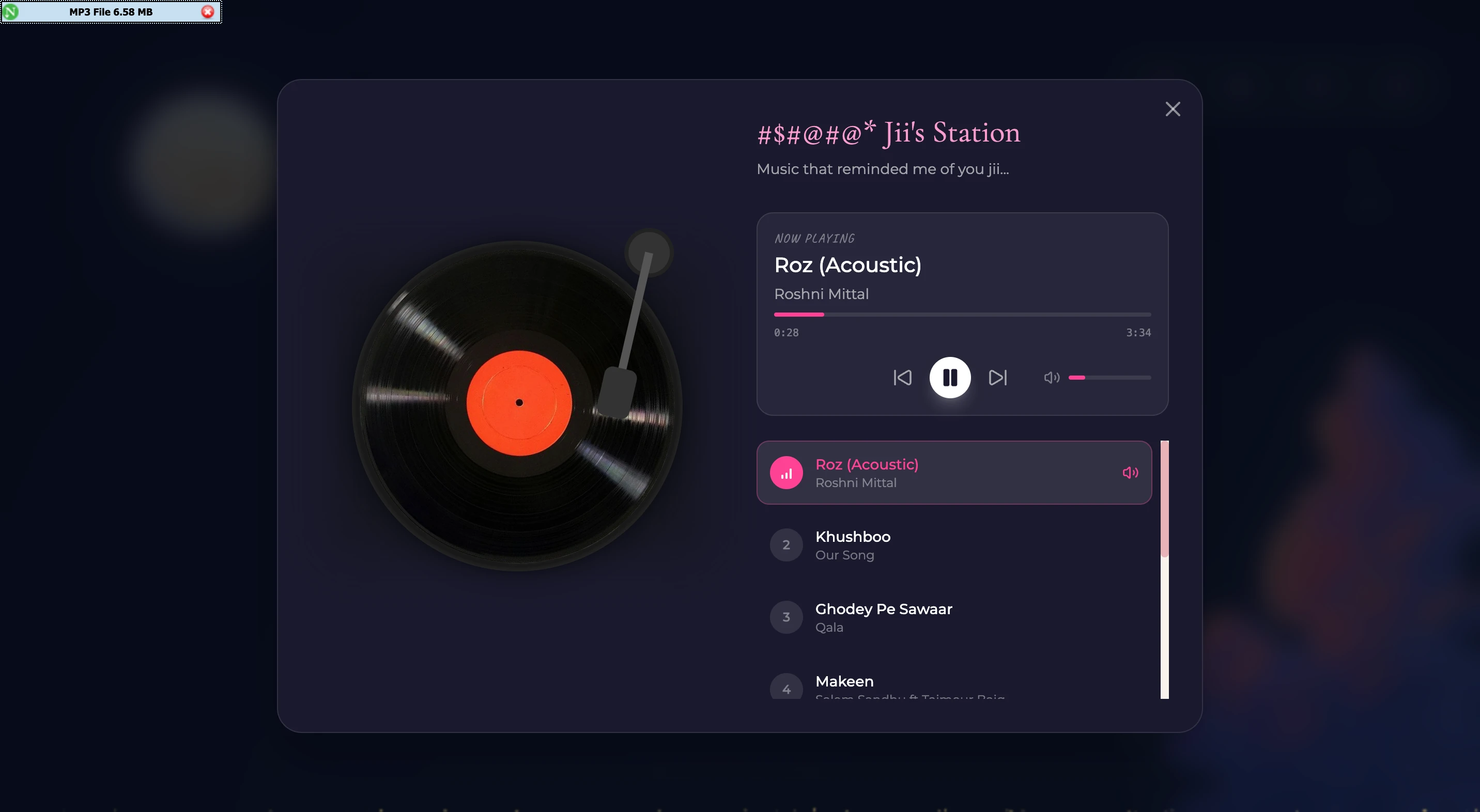
Gallery, Poems, FAQ
Gallery — A masonry layout of photos with captions. Clicking a photo expands it. The images are scanned memory-sketches, not stock photos.
Poems — Original poems I wrote. The modal renders them in Cormorant Garamond italic, centered, with generous line spacing. I'm not a poet but I tried.
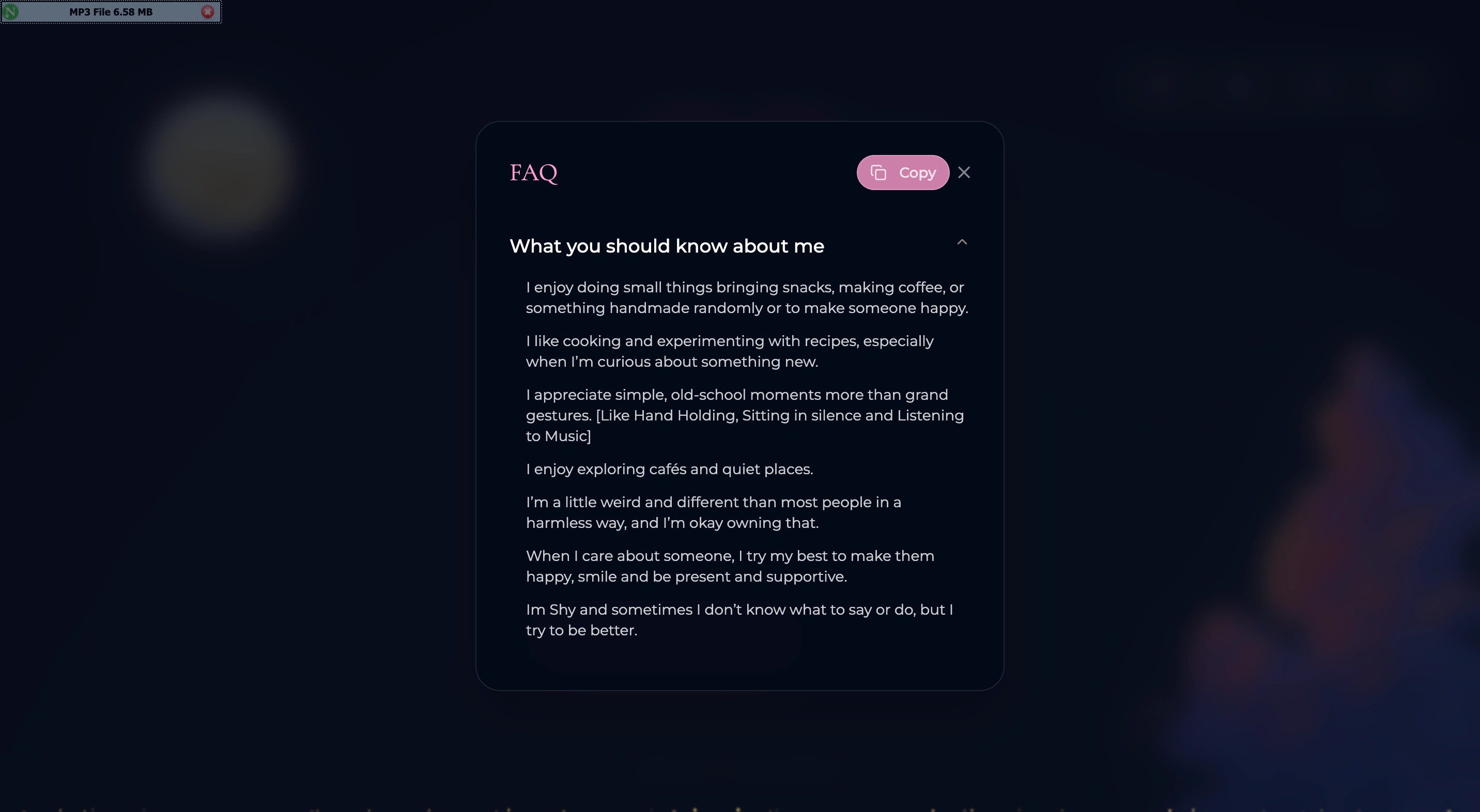
FAQ: "Why Me?" — A Q&A answering the question before she had to ask it. Partly sweet, partly deflection through humor.
When She Says Yes
Clicking "Yes, Always" triggers three things simultaneously:
- Confetti — two cannons fire from both sides of the screen for 1.5 seconds. Pink, periwinkle, white.
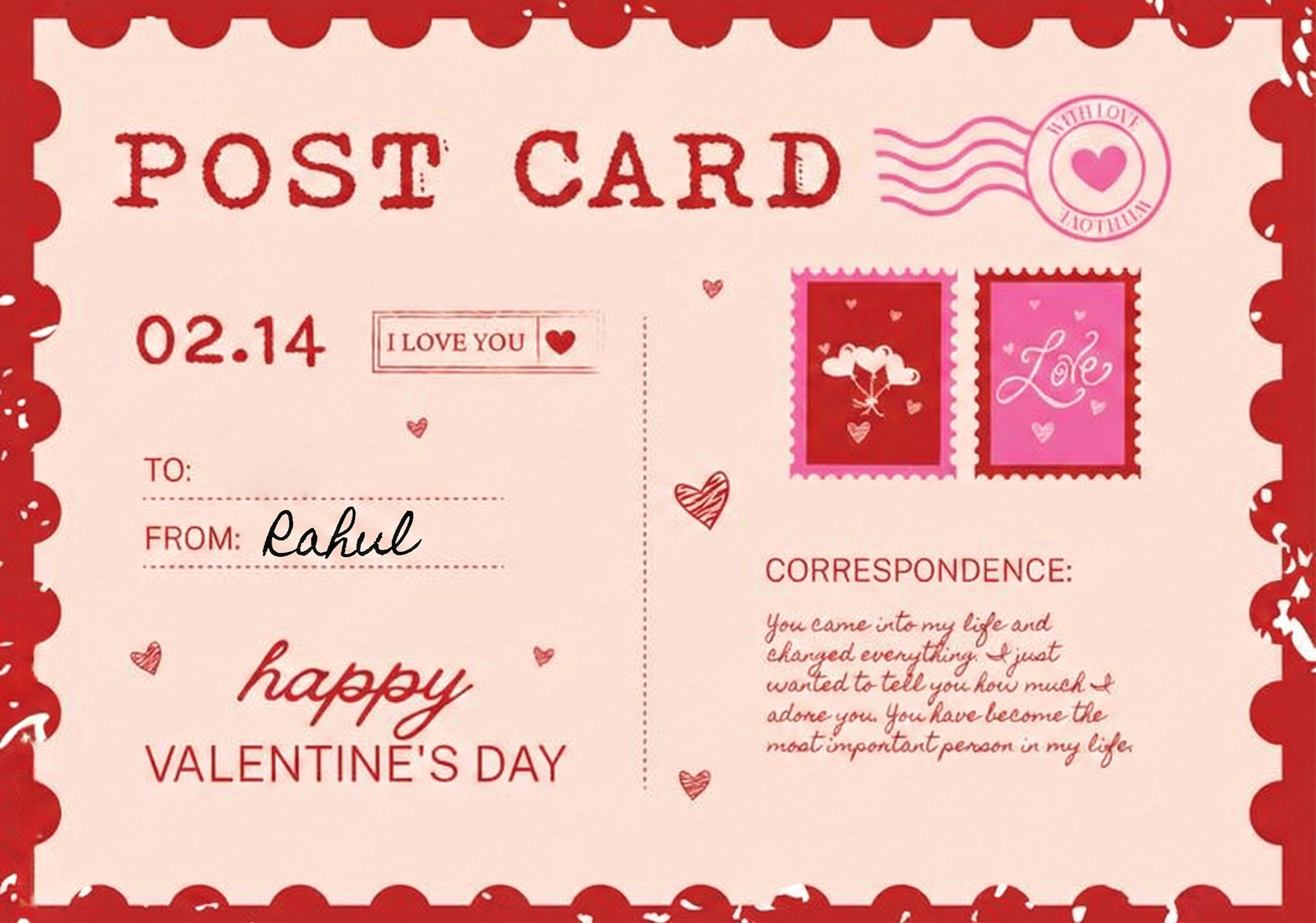
- Postcard download — a PNG postcard auto-downloads after 1 second via a programmatically clicked
<a>tag. - A message form slides in — the main card splits into a two-column layout. Left: the postcard, slightly rotated, with a spring entrance. Right: a frosted glass card with "Oooooooo Sachi mee?" in Cormorant Garamond italic, and a textarea to write back.
confetti({
  particleCount: 2,
  angle: 60,
  spread: 55,
  origin: { x: 0 },
  colors: ['#FF4294', '#92B8E4', '#ffffff']
});
When she submits the message, the form transitions to a glowing heart icon and "Message Received / My heart is yours."
The Backend: Real-Time Analytics
Every interaction is tracked via Convex — a real-time backend with live subscriptions.
| Event | Data captured |
|---|---|
| Page visit | Timestamp |
| No button click | Running click count, IP, user agent |
| Yes button click | No-click count at time of yes |
| Message submitted | The message, no-click count, user agent |
I can watch visits and No-clicks happen in real time from the Convex dashboard. The Stats modal on the site shows live totals.
The Stack
| Layer | Tech |
|---|---|
| Framework | Next.js + TypeScript |
| Animations | Framer Motion |
| Backend | Convex (real-time) |
| Confetti | canvas-confetti |
| Typography | Cormorant Garamond (serif) + Montserrat (sans) |
| Styling | Tailwind CSS |
| Audio | Custom useAudioPlayer hook over the HTML Audio API |
What I Learned
Over-engineering a Valentine's card taught me more about physics-based animation than any tutorial. The magnetic button is just math — cursor distance from center × spring constant — but when it feels like the button is reaching for you, something clicks. The spring config matters enormously: low damping makes it feel alive, high stiffness keeps it snappy.
The "No" button was the most fun to build. There's something deeply satisfying about a button that refuses to be pressed. Every time I tested it I accidentally laughed.
And the entrance message sequence — nine quiet sentences fading in and out — ended up being the part I spent the most time on. Not the code (it's a setTimeout chain), but the words. Getting the pacing right. Making sure it didn't feel like a presentation but like someone actually talking to you.
Built with a lot of love, and maybe a little too much Framer Motion.
// END_OF_TRANSMISSION